

Test with Cards
In the sandbox environment, you can use standard test card numbers to simulate a range of payment scenarios - no real card details are needed.
Test cards
Your account is processed through either Adyen or Stripe. Expand the section that matches your account - if you are not sure which, ask your account manager.
Adyen test cards
Use any of the following card numbers in the Super payment component when testing. For all cards if not specified otherwise, use:
- Expiry:
03/30 - CVC:
737 - Postcode: any value
Simulate a successful payment
📘 Note
The declined payment scenarios below are triggered by the Card Holder Name entered in the payment component.
Simulate a declined payment
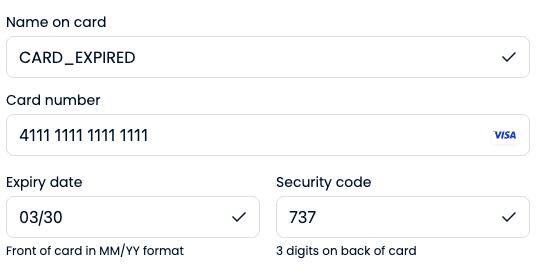
Test 3D Secure authentication
Simulate a surcharge payment
Surcharging must be enabled on your brand before this scenario will work. Ask your account manager to enable it. For how surcharging works and how the surcharge is applied, see Apply a Surcharge.
For the complete list of Adyen test cards and regional scenarios, see Adyen's testing documentation.
Stripe test cards
Use any of the following card numbers in the Super payment component when testing. For all cards unless specified otherwise, use:
- Expiry: any future date
- CVC: any 3 digits (4 digits for American Express)
- Postcode: any value
Simulate a successful payment
📘 Note
Unlike Adyen, Stripe decline scenarios are triggered by the card number, not the Card Holder Name. Enter any name in the payment component.
Simulate a declined payment
Super returns its own declineCode in the API response rather than Stripe's raw value - see Handling decline responses below.
Test 3D Secure authentication
For the complete list of Stripe test cards and regional scenarios, see Stripe's testing documentation.
Handling decline responses
When a card is declined, the API returns a 402 HTTP status. The response includes an extensions.issues object with details about why the payment failed - use these to show the customer a meaningful error rather than a generic message.
{
  "extensions": {
    "issues": {
      "declineReason": "Your card has insufficient funds.",
      "declineCode": "INSUFFICIENT_FUNDS",
      "declineClassification": "UNRESTRICTED"
    }
  }
}
declineReason is the reason the payment method was declined, as shown in the Business Portal. It is written to be safe to display to the customer, so you can show it directly in your UI.
declineCode identifies the specific reason the card was declined. The full list of possible values is:
AUTHENTICATION_REQUIRED DUPLICATE_SUSPECTED FRAUD_SUSPECTED GENERIC_DECLINE INSUFFICIENT_FUNDS INVALID_ADDRESS INVALID_AMOUNT INVALID_CVC INVALID_EXPIRY_MONTH INVALID_EXPIRY_YEAR INVALID_NUMBER INVALID_PIN MERCHANT_BLACKLIST PAYMENT_METHOD_ATTEMPTS_EXCEEDED PAYMENT_METHOD_EXPIRED PAYMENT_METHOD_NOT_SUPPORTED PAYMENT_METHOD_REVOKED PROCESSING_ERROR
declineClassification tells you whether the decline code is safe to expose:
declineReasonis always safe to show to the customer regardless ofdeclineClassification.
Use the test cards in the declined payments table above, under your processor's section, to trigger different declineCode values and verify your error handling handles each case correctly.
Decline details in the webhook
The failure reason is also sent in the payment.failed webhook, so you can record why a payment failed server-side - even if the customer closes their browser before your front end handles the response.
{
  "data": {
    "amount": {
      "amount": 5000,
      "currency": "GBP",
      "amountMultiplier": 100
    },
    "source": "checkoutSession",
    "status": "PaymentFailed",
    "brandId": "123-123-123-123",
    "metadata": {
      "lastName": "Smith",
      "firstName": "John"
    },
    "paymentId": "123-123-123-123",
    "declineCode": "PAYMENT_METHOD_EXPIRED",
    "fundingSummary": null,
    "declineReason": "The card has expired.",
    "surchargeAmount": null,
    "paymentReference": "Order-123",
    "externalReference": "Order-123",
    "paymentInitiatorId": "YOUR_PAYMENT_INITIATOR_ID"
  },
  "eventId": "evt_123",
  "eventType": "payment.failed",
  "eventDatetime": "2026-03-15T10:00:00.000Z"
}
The webhook carries the same declineCode and declineReason fields as the API response above. Both are null when no mapped failure reason is available.
Testing refunds
Once you have a completed sandbox payment, you can test the refund flow either via the API or directly from the sandbox portal, see refund a payment for more.
Via the API, call POST /refunds with the transactionId from your test payment:
{
  "transactionId": "transactionId",
  "amount": 1000,
  "externalReference": "TestRefund"
}
To test a partial refund, pass an amount less than the original payment amount. To test a full refund, pass the full original amount.
Via the sandbox portal, navigate to the payment in business.test.superpayments.com, open the transaction, and initiate a refund from there.
What to verify for refunds
- The refund API returns a
transactionReference - Your webhook endpoint receives a
RefundSuccessevent - Partial refunds reflect the correct remaining balance in the
fundingSummaryobject - Your integration handles the
RefundSuccesswebhook correctly - for example, updating order status or notifying the customer
What to verify
After completing a test card payment, confirm:
- The payment status from
GET /payments/{transactionId}matches the expected outcome (e.g.PaymentSuccessfor success,PaymentFailedfor a decline) - Declined payments are handled gracefully in your UI - the customer should see a clear error and be able to retry
- Your webhook endpoint received the correct event (
PaymentSuccessorPaymentFailed) - 3DS authentication flows complete correctly and the result is reflected in the payment status
Next steps
Updated 11 days ago