

Payment Links
A streamlined guide to our no-code payment solution.
Payment Links enable you to accept payments from your customers by generating a unique URL for a specific transaction. We manage the secure checkout environment and handle all sensitive payment data, minimizing your technical overhead.
The Payment Journey
- Request Payment Link: Send a request to our API; Super will return a unique link.
- Share with Customer: Send the URL to your customer via email, SMS, or your preferred digital channel.
- Secure Checkout: The customer enters their payment details in our protected, hosted environment.
- Return to Site: Once the transaction is processed, we redirect the customer to your designated success or failure URL.
Creating a Payment Link
Payment links can be created in two ways depending on your use case.
Via the Business Portal
Best for sales teams, ad-hoc payments, and one-off invoices - no code required.
-
Log in to the Business Portal and select Payment links in the sidebar.
-
Select Create payment link in the top right.
-
Set up payment link - enter the core details:
- Brand (required) - the brand the payment link belongs to. Choose this before entering an amount.
- Amount (required) - the amount to collect.
- Your reference (optional) - an internal reference such as an invoice number. Your customer will not see it.
- Expiry date (optional) - a date after which the link can no longer be used.
-
Order details (optional) - describe what the payment is for. Select Car rental, Flight, Hotel or Product, complete the fields, then select Save details:
- Car rental and Hotel - check-in date and check-out date.
- Flight - flight number and flight date.
- Product - product description, SKU, quantity, unit price and delivery date.
Car rental, Flight and Hotel also take traveller details. Enter a first and last name, and select Add another traveller for each additional passenger. These three categories have an optional Total price, which does not need to match the payment link amount.
-
Address (optional) - enter your customer's Shipping address. Start typing in Search for an address, or select Enter address manually. You can also add a first name, last name, phone number and email address.
The Billing address defaults to Same as shipping address. Clear that checkbox to enter a different billing address.
-
Additional options (optional):
- Custom fields - select Add custom field to store additional information against the payment link as key-value pairs. Up to 10 fields are allowed.
- Custom URLs - set a Success URL, Failed URL and Cancelled URL to control where customers are sent once they have finished with the link.
-
Select Create payment link, then copy the generated link and share it with your customer.
Note: You can edit a payment link until it is paid, expired or deleted.
Via the API
Best for automated workflows where you need full control over redirect URLs and request parameters.
The diagram below illustrates the full API integration flow.
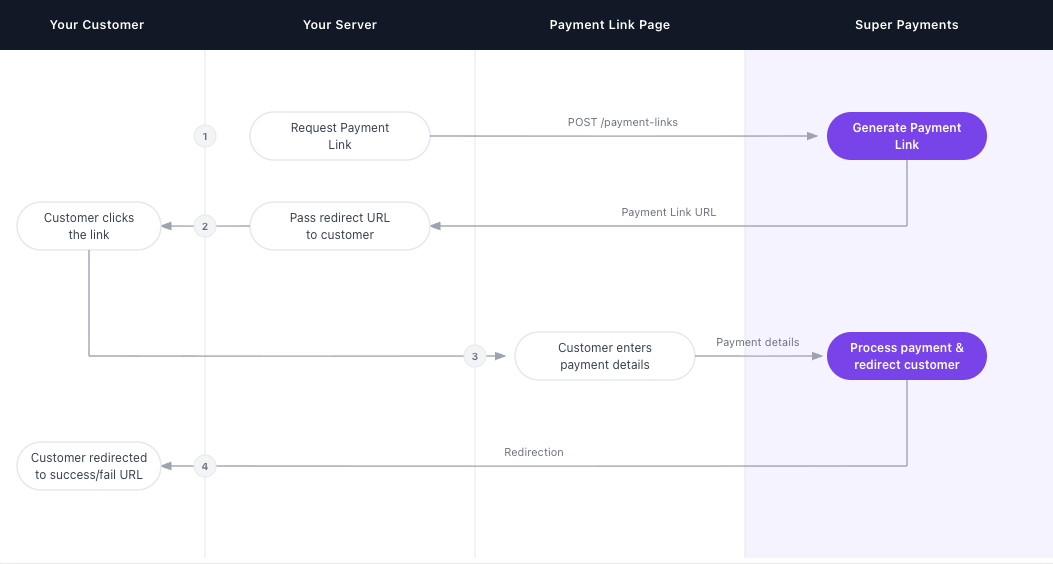
Step 1: Request a Payment Link
Make a POST request to the /payment-links endpoint with the amount, reference, and your redirect URLs.
Request Example
curl --location 'https://api.superpayments.com/2026-04-01/payment-links' \
--header 'Content-Type: application/json' \
--header 'Accept: application/json' \
--header 'Authorization: YOUR_SUPER_SECRET_KEY' \
--data '{
  "brandId": "YOUR_BRAND_ID",
  "externalReference":"Order-123",
  "amountInMinorUnits": 5000,
  "purpose": "PURCHASE",
  "successUrl":"https://www.example.com/success",
  "failureUrl":"https://www.example.com/failure",
  "cancelUrl":"https://www.example.com/cancel"
  }'
curl --location 'https://api.test.superpayments.com/2026-04-01/payment-links' \
--header 'Content-Type: application/json' \
--header 'Accept: application/json' \
--header 'Authorization: YOUR_SUPER_SECRET_KEY' \
--data '{
"brandId": "YOUR_BRAND_ID",
"externalReference":"Order-123",
"amountInMinorUnits": 5000,
"purpose": "PURCHASE",
"successUrl":"https://www.example.com/success",
"failureUrl":"https://www.example.com/failure",
"cancelUrl":"https://www.example.com/cancel"
}'Response Example
200 Payment Link Created
{
  "amountInMinorUnits": 5000,
  "brandId": "YOUR_BRAND_ID",
  "cancelUrl": "https://www.example.com/cancel",
  "createdAt": "2026-01-01T01:01:01.000Z",
  "expiresAt": null,
  "externalReference": "Payment Link Example",
  "failureUrl": "https://www.example.com/failure",
  "id": "8f255c5f-fdfc-4fa6-8642-297a17209234",
  "metadata": null,
  "paymentReferences": [],
  "purpose": "PURCHASE",
  "status": "UNPAID",
  "successUrl": "https://www.example.com/success",
  "updatedAt": "2026-01-01T01:01:01.000Z",
  "url": "https://link.test.superpayments.com/id/8f255c5f-fdfc-4fa6-8642-297a17209234"
}
Step 2: Share the Link with Your Customer
Pass the url from the response to your customer via email, SMS, or any digital channel.
Step 3: Customer Completes Payment
The customer is directed to the hosted payment link page where they enter their payment details. Super securely processes the transaction.
Step 4: Customer is Redirected
Once the payment is processed, the customer is redirected to your successUrl or failureUrl depending on the outcome.
Confirm the Payment Status
You can confirm the outcome of a payment link either by receiving a webhook, or by polling the Get Payment Link endpoint.
Webhooks
Super sends a webhook when a payment made through a payment link completes. payment.success is sent when the payment succeeds and payment.failed when it does not, so handle both to capture every outcome. A payment.failed event includes declineCode and declineReason explaining why the payment did not go through - see Handling decline responses.
The data.source field is set to paymentLink, so you can tell payment link events apart from payments taken through your other integrations.
No enablement is required - webhooks fire for payment links as soon as you have a webhook endpoint configured. Set one up in the Business Portal under Developers → Webhooks. These webhooks follow the same format as every other Super webhook - see the Webhook Documentation for setup and signature verification.
{
  "data": {
    "amount": {
      "amount": 5000,
      "currency": "GBP",
      "amountMultiplier": 100
    },
    "source": "paymentLink",
    "status": "PaymentSuccess",
    "brandId": "123-123-123-123",
    "paymentId": "123-123-123-123",
    "fundingSummary": {
      "superFundedAmount": {
        "amount": 0,
        "currency": "GBP",
        "amountMultiplier": 100
      },
      "customerFundedAmount": {
        "amount": 5000,
        "currency": "GBP",
        "amountMultiplier": 100
      },
      "merchantFundedAmount": {
        "amount": 0,
        "currency": "GBP",
        "amountMultiplier": 100
      },
      "cashPayableToMerchant": {
        "amount": 5000,
        "currency": "GBP",
        "amountMultiplier": 100
      }
    },
    "surchargeAmount": {
      "amount": 600,
      "currency": "GBP",
      "amountMultiplier": 100
    },
    "paymentReference": "PAYMENT123",
    "externalReference": "Order-123",
    "paymentInitiatorId": "123-123-123-123"
  },
  "eventId": "evt_123",
  "eventType": "payment.success",
  "eventDatetime": "2026-03-15T10:20:28.000Z"
}
Polling the API
If you are not using webhooks, retrieve the final status by calling the Get Payment Link endpoint with the payment link ID.
Request Example
curl --location 'https://api.superpayments.com/2026-04-01/payment-links/2826959b-3319-4f43-b1bb-e5adc7efaecb' \
--header 'Accept: application/json' \
--header 'Authorization: YOUR_SUPER_SECRET_KEY'
curl --location 'https://api.test.superpayments.com/2026-04-01/payment-links/2826959b-3319-4f43-b1bb-e5adc7efaecb' \
--header 'Accept: application/json' \
--header 'Authorization: YOUR_SUPER_SECRET_KEY'Response Example
200 Payment Link Details
{
  "amountInMinorUnits": 5000,
  "brandId": "YOUR_BRAND_ID",
  "cancelUrl": "https://www.example.com/cancel",
  "createdAt": "2026-01-01T01:01:01.000Z",
  "expiresAt": "2026-01-01T01:01:01.000Z",
  "externalReference": "Order 123",
  "failureUrl": "https://www.example.com/failure",
  "id": "2826959b-3319-4f43-b1bb-e5adc7efaecb",
  "metadata": null,
  "paymentReferences": [],
  "purpose": "PURCHASE",
  "status": "UNPAID",
  "successUrl": "https://www.example.com/success",
  "updatedAt": "2026-01-01T01:01:01.001Z",
  "url": "https://link.test.superpayments.com/id/2826959b-3319-4f43-b1bb-123456643"
}
Payment Link Status Definitions
| Status | Description |
|---|---|
UNPAID | No successful payment has been processed against the link. |
PAID | The transaction was successfully authorised and funds have been captured. |
📘 Expired links return
UNPAIDThe API returns only
PAIDorUNPAID. A link that has passed its expiry date still returnsUNPAID, so check the link's expiry date rather than relying on the status to tell you whether it can still be paid. The Business Portal shows Expired as a separate state for display purposes only.
Updated 9 days ago