

Hosted Page
A streamlined guide to integrating our secure, hosted payment page solution.
The Hosted Page solution allows you to redirect your customers to a secure environment managed by Super to complete their transaction. We handle all sensitive payment data, ensuring a secure checkout experience while minimising your integration effort.
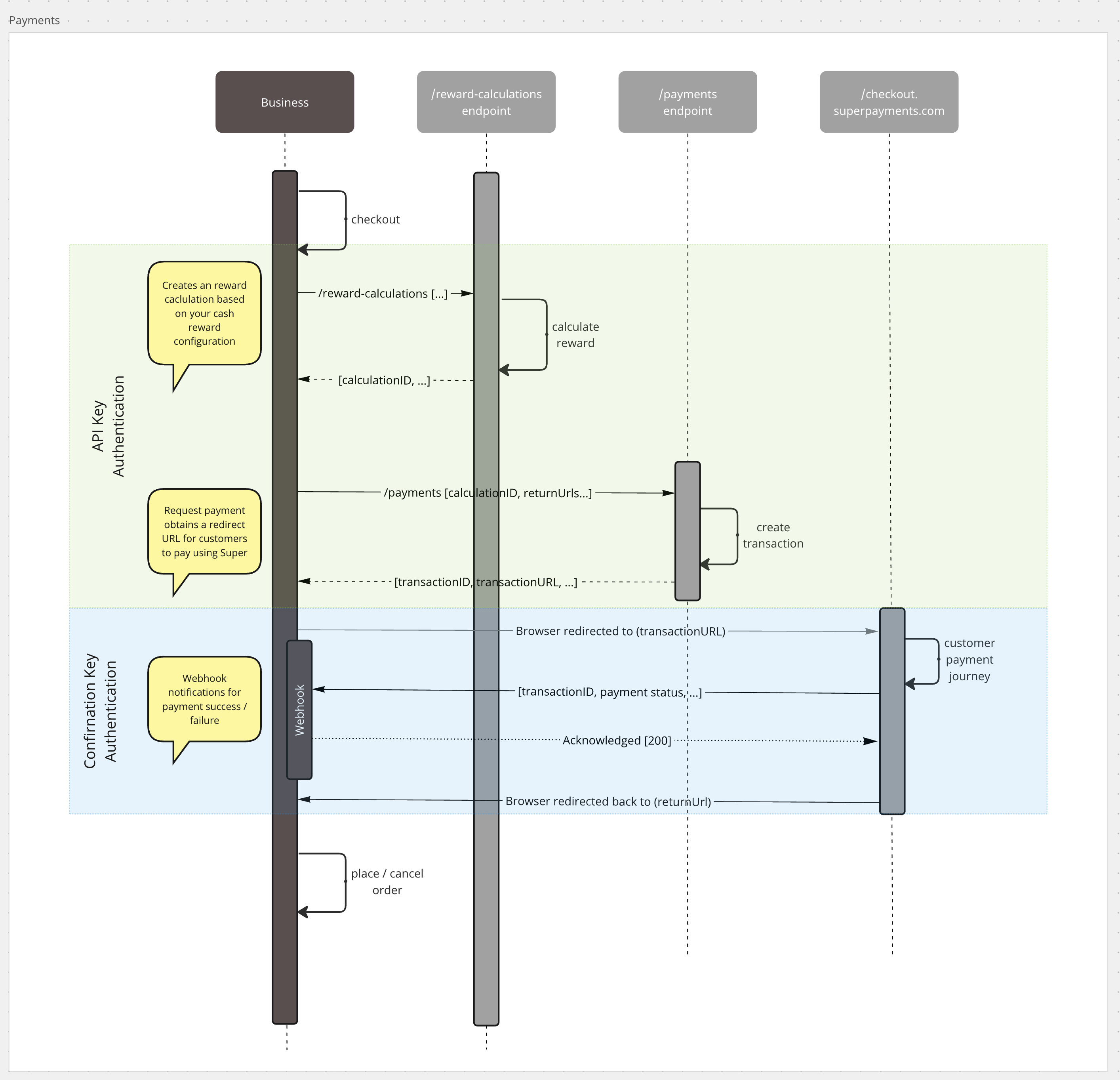
The Payment Journey
- Calculate Cash Rewards: Request a reward calculation to generate the required ID for the transaction.
- Create a Payment Intent: Send a request to our API; Super will return a unique secure link.
- Redirect Customer: Direct your customer to the provided URL to complete their purchase.
- Secure Checkout: Your customer enters their payment details on our hosted page.
- Return to Site: Once the transaction is processed, we redirect the customer to your designated success or failure URL.
Integration Guide
Follow the steps below to execute an example request, handle the response, and manage the customer redirect.
Step 1: Calculate Cash Rewards
Before creating a payment intent, request a reward calculation to obtain your rewardCalculationId. This ID is required in the payment intent request body.
Step 2: Create a Payment Intent
Make a POST request to the /payments endpoint with the amount, reward calculation ID, and your redirect URLs.
Request Example
curl --location 'https://api.superpayments.com/2026-08-01/payments' \
--header 'Content-Type: application/json' \
--header 'Accept: application/json' \
--header 'Authorization: YOUR_SUPER_SECRET_KEY' \
--data '{
  "amount": 5000,
  "currency": "GBP",
  "paymentInitiatorId": "YOUR_PAYMENT_INITIATOR_ID",
  "rewardCalculationId": "YOUR_REWARD_CALCULATION_ID",
  "offSession": false,
  "externalReference": "Order-123",
  "successUrl": "https://www.example.com/success",
  "failureUrl": "https://www.example.com/failure",
  "cancelUrl": "https://www.example.com/cancel"
}'
curl --location 'https://api.test.superpayments.com/2026-08-01/payments' \
--header 'Content-Type: application/json' \
--header 'Accept: application/json' \
--header 'Authorization: YOUR_SUPER_SECRET_KEY' \
--data '{
"amount": 5000,
"currency": "GBP",
"paymentInitiatorId": "YOUR_PAYMENT_INITIATOR_ID",
"rewardCalculationId": "YOUR_REWARD_CALCULATION_ID",
"offSession": false,
"externalReference": "Order-123",
"successUrl": "https://www.example.com/success",
"failureUrl": "https://www.example.com/failure",
"cancelUrl": "https://www.example.com/cancel"
}'Response Example
200 Payment Intent Created
{
  "brandId": "YOUR_BRAND_ID",
  "externalReference": "Order-123",
  "id": "a792e89d-658c-4acb-8410-6e08f82636cc",
  "offSession": false,
  "paymentInitiatorId": "YOUR_PAYMENT_INITIATOR_ID",
  "redirectUrl": "https://web-checkout.test.superpayments.com/checkout-host?pi-token=eyJhbGciOiJIUzI1....=a792e89d-658c-4acb-8410-6e08f82636cc&start=payment",
  "status": "PaymentPending"
}
Step 3: Redirect the Customer
Use the redirectUrl from the API response to direct your customer to the secure hosted payment page.
Step 4: Customer Completes Payment
The customer enters their payment details on the hosted page. Super securely processes the transaction.
Step 5: Customer is Redirected
Once the payment is processed, the customer is redirected to your successUrl or failureUrl depending on the outcome. Super will simultaneously trigger a Payment Status Webhook with the final result.
Saving a Card via Hosted Page
You can save a customer's card during a Hosted Page payment by creating a customer record first and including their ID in the payment intent request. Once the customer completes the payment, Super sends a customer.payment_method.enabled webhook containing the paymentMethodId for future charges.
Step 1: Create a Customer
Before creating the payment intent, create a customer record in Super. Store the id returned in the response.
Request
curl --location 'https://api.superpayments.com/2026-08-01/customers' \
--header 'Content-Type: application/json' \
--header 'Accept: application/json' \
--header 'Authorization: YOUR_SECRET_KEY' \
--data '{
  "brandId": "YOUR_BRAND_ID",
  "emailAddress": "[email protected]",
  "externalReference": "customer_123",
  "firstName": "John",
  "lastName": "Smith",
  "phoneNumber": "07462123456"
}'
curl --location 'https://api.test.superpayments.com/2026-08-01/customers' \
--header 'Content-Type: application/json' \
--header 'Accept: application/json' \
--header 'Authorization: YOUR_SECRET_KEY' \
--data '{
"brandId": "YOUR_BRAND_ID",
"emailAddress": "[email protected]",
"externalReference": "customer_123",
"firstName": "John",
"lastName": "Smith",
"phoneNumber": "07462123456"
}'Response
{
  "id": "cus_123",
  "brandId": "YOUR_BRAND_ID",
  "emailAddress": "[email protected]",
  "externalReference": "customer_123",
  "firstName": "John",
  "lastName": "Smith",
  "paymentMethods": [],
  "createdAt": "2026-03-15T10:00:00.000Z",
  "updatedAt": "2026-03-15T10:00:00.000Z"
}
Step 2: Create the Payment Intent with Card Saving
Include the customer object in your payment intent request with savePaymentMethod: true and the id from Step 1.
Request
curl --location 'https://api.superpayments.com/2026-08-01/payments' \
--header 'Content-Type: application/json' \
--header 'Accept: application/json' \
--header 'Authorization: YOUR_SECRET_KEY' \
--data '{
  "amount": 5000,
  "currency": "GBP",
  "paymentInitiatorId": "YOUR_PAYMENT_INITIATOR_ID",
  "rewardCalculationId": "YOUR_REWARD_CALCULATION_ID",
  "externalReference": "Order-123",
  "offSession": false,
  "customer": {
    "id": "cus_123",
    "savePaymentMethod": true
  },
  "successUrl": "https://your-site.com/success",
  "failureUrl": "https://your-site.com/failure",
  "cancelUrl": "https://your-site.com/cancel"
}'
curl --location 'https://api.test.superpayments.com/2026-08-01/payments' \
--header 'Content-Type: application/json' \
--header 'Accept: application/json' \
--header 'Authorization: YOUR_SECRET_KEY' \
--data '{
"amount": 5000,
"currency": "GBP",
"paymentInitiatorId": "YOUR_PAYMENT_INITIATOR_ID",
"rewardCalculationId": "YOUR_REWARD_CALCULATION_ID",
"externalReference": "Order-123",
"offSession": false,
"customer": {
"id": "cus_123",
"savePaymentMethod": true
},
"successUrl": "https://your-site.com/success",
"failureUrl": "https://your-site.com/failure",
"cancelUrl": "https://your-site.com/cancel"
}'Step 3: Receive the paymentMethodId via Webhook
paymentMethodId via WebhookOnce the payment is authorised and the card saved, Super sends a customer.payment_method.enabled event to your webhook endpoint. Store the paymentMethodId from this event against the customer in your system.
{
  "data": {
    "type": "CARD",
    "usage": "OFF_SESSION",
    "status": "ENABLED",
    "customerId": "cus_123",
    "merchantId": "123-123-123-123",
    "paymentMethodId": "pm_123"
  },
  "eventId": "evt_test_123",
  "eventType": "customer.payment_method.enabled",
  "eventDatetime": "2026-03-15T10:01:00.000Z"
}
📘 For full webhook setup guidance, see the Webhook Documentation.
Once you have the paymentMethodId, you can use it to charge the customer at any time - see Charge a Saved Card.
Confirm the Payment Status
Super sends a Payment Status Webhook when a transaction is complete, providing the final outcome in the transactionStatus field. You can also poll our GET Payment endpoint at any time to manually verify the state of a payment - useful for reconciling transactions or confirming status after a customer returns to your site.
Request Example
curl --location 'https://api.superpayments.com/2026-08-01/payments/{{TRANSACTION_ID}}' \
--header 'Accept: application/json' \
--header 'Authorization: YOUR_SUPER_SECRET_KEY'
curl --location 'https://api.test.superpayments.com/2026-08-01/payments/{{TRANSACTION_ID}}' \
--header 'Accept: application/json' \
--header 'Authorization: YOUR_SUPER_SECRET_KEY'Response Example
200 Payment Transaction Details
{
  "brandId": "YOUR_BRAND_ID",
  "externalReference": "Order-123",
  "transactionId": "48513e60-0c3f-40b6-86c3-8a260f9f0f96",
  "transactionReference": "CAKEXX5CAUTMM9W9AK",
  "transactionAmount": 2600,
  "transactionStatus": "PaymentSuccess",
  "funding": [
    {
      "type": "CARD",
      "reference": "CAKEXX5CAUTMM9W9AK",
      "amount": {
        "amount": 2600,
        "currency": "GBP"
      },
      "fundingDetails": {
        "type": "CARD",
        "last4": "4242",
        "issuer": "visa",
        "funding": "credit",
        "cvcCheck": "pass"
      }
    }
  ]
}
Payment Status Definitions
| Status | Description |
|---|---|
PaymentSuccess | The transaction was authorised and completed successfully. |
PaymentPending | The transaction is currently being processed by the provider. |
PaymentFailed | The transaction was declined or could not be processed. |
PaymentCancelled | The customer manually cancelled the transaction before completion. |
PaymentAbandoned | The customer closed the checkout session without taking action. |
PaymentDelayed | The payment requires additional time for verification. |
Tip: For more details on setting up webhooks, see our Webhook Documentation.
Updated 2 months ago